Author Archives: Factor Mystic

Default Programs Editor: Examining the GUI and A look forward at version 2

Lately I’ve been working on figuring out what needs to happen for the next major version of Default Programs Editor. There will be some additional core functionality (such as protocol associations; that would solve things like this), but the main focus will be the User Interface- some of you will be pleased to know that there will be one this time, and it will be a lot better than the “Programmer Who Is Me Interface” of version 1.x. This was one of the major criticisms of the program, and I recognize that it was completely on target. After all, the user interface is the application. So as I’m working on version 2, I’ve got Microsoft’s very good Windows Vista User Experience Guidelines open at all times.

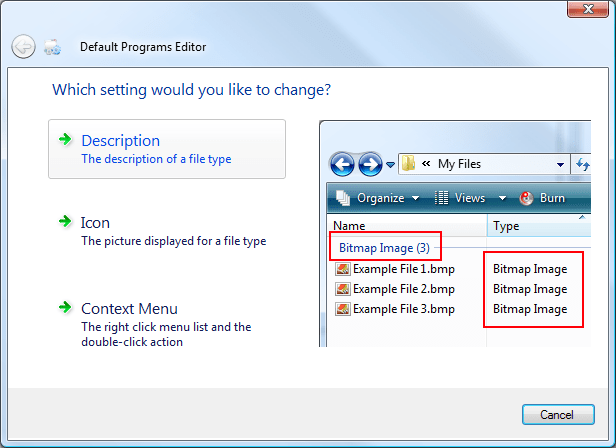
The core of the version 2 experience will be through Aero Wizards:
14-feb-09-wizard

The goal with the wizard UI is to decrease the number of decisions a user needs to make to do what they want to do. Command links are great for this. Command links have sub-notes to help smooth out the unavoidable jargon, along with mouseover image previews.

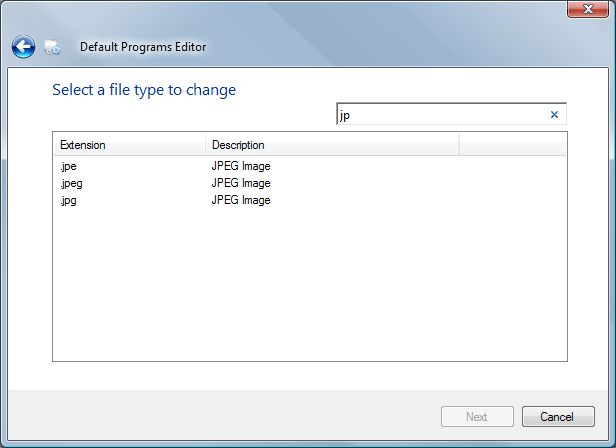
I’m also taking a close look at how induvidual peices of the UI communicate with the user. Here’s an example of the old version 1.x style of a list of file extensions:
14-feb-09-old-extension-list-format

This is sufficient to select a specific extension by itself, however, this is isn’t actually the goal of the list- it is to select a file type (file types can map to multiple extensions, as in this screenshot). Also, there is unwanted redundancy. If a user knew they wanted to select a file type and not just a single extension, this UI would proove confusing, as it only allows the user to select one item.
14-feb-09-new-extension-list-format

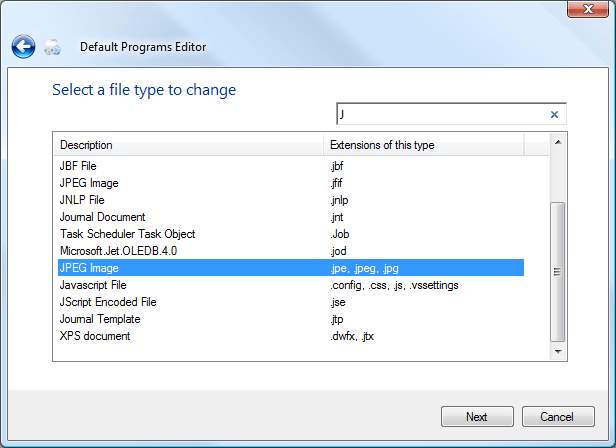
The new list addresses these problems first by swapping the columns- this puts the empasis on the file type. All the extensions that map to this type are now shown on the same line, eliminating redundancy. The search functionality is basically unchanged, searching for either a file type description or an extension will pare the list down as expected.

There will also be some kind of “Advanced Mode” as well besides the Wizard system, but I’m not sure exactly what that will entail as of yet. It will probably be similar to the 1.x UI, but with increased coherency, such as the new file types list.

A Quick Lesson In Overengineering

I was tapping out a quick for-fun project where I wanted to iterate through all the letters in the alphabet.

[sourcecode language=”csharp”]
//other logic
foreach(char letter in //hmm…
[/sourcecode]

I didn’t really want to manually initialize an array new char[]{"A", "B", "C" and I recalled how other languages have shortcuts for building lists, like ["A".."Z"]. It’s called “List Comprehension” and it’s available in a lot of cool languages.

So I began to think about how to accomplish this in C#. The .. syntax obviously didn’t work. Googling the topic brought me to Wikipedia, which lists a couple of examples using Enumerable.Range.

“Okay,” I mused, “I can build on that easily!” Enumerable.Range(65, 26) will be the starting point since “A” is ASCII 65, and there are 26 letters in the alphabet. If I can just convert each one of these to a char, I’m golden. The function I found was ConvertAll, but that’s a LINQ extension method for the List<T> type. No problem, all I need is Enumerable.Range(65, 26).ToList().ConvertAll. It’s simple to convert an int to its char by casting, so my implementation of List Comprehension in C# for the alphabet was

[sourcecode language=”csharp”]
Enumerable.Range(65, 26).ToList().ConvertAll(delegate(int value) { return (char)value; })
[/sourcecode] 

Check it out, it works great, what a clever programmer I am!

[sourcecode language=”csharp”]
foreach(char letter in Enumerable.Range(65, 26).ToList().ConvertAll(delegate(int value) { return (char)value; }))
{
//breakpoint here to confirm
}
[/sourcecode]


And now, the moral of the story: In C#, the String class implements IEnumerable<char>. Which means that all I needed to do was write:

[sourcecode language=”csharp”]
foreach(char letter in “ABCDEFGHIJKLMNOPQRSTUVWXYZ”)
{
//how about that
}
[/sourcecode]
It’s so much simpler, shorter, and it’s instantly understandable. Learn from me, don’t be an overengineer!


P.S. I could have saved myself the embarassment if I had remembered that the only reasonable numbers you should see in source code are 0, 1, and 2.


Special thanks to the #cobol crew for showing me the error of my ways.

Default Programs Editor 1.3 update

Version 1.3- August 9, 2008

  • Fixed a minor UI bug where not all references were updated when the “Rename ProgID to File Type” preference was changed.
  • About/Help link now points to this program’s own landing page instead of it’s blog category.
  • The information url comment in exported .reg files has been updated to this program’s own page instead of it’s blog category.
  • The program now checks for updates automatically when it is launched. This can be disabled in Advanced Configuration.
  • A couple of additional minor UI adjustments (including a misspelled word in the error dialog- whoops!).
  • Added a dialog to enable the deletion of both an extensions and ProgID’s.
  • Fixed an rare bug that caused an immediate crash (both XP and Vista) based on information from online crash reports.
  • Fixed a bug where extensions without ProgID’s would have a blank Friendly Type Name instead of EXT File, which is what Windows Explorer shows.
  • Program identification comment at the top of generated .reg files now includes the version number.
  • Moved the “Include extensions without a ProgID” checkbox to the extensions filter options list.

Several interesting changes in this release.  Also, I’ve enabled comments on the blog.

Download