10Mar/086
Turn Off Monitor v3
Changes:
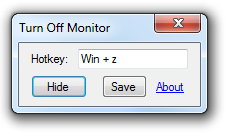
- Modifier key (shift/ctrl/alt/win) no longer necessary for the hotkey
- You must click "Save" to make the hotkey stick, it's not automatic like before
- 'About' link now takes you to the category for this utility, not a specific page, like I originally intended
Known issues:
- Config files saved a bit differently now, and it's incompatible with the old way, so you might get an error when you first run. Solution: Just save a hotkey, which will overwrite the old config file with the new one.
- If you press a modifier then the key you want for the hotkey, sometimes it doesn't work. Solution: Press and release the modifier key you want, then press the other key separately. Then it works.
Like before, hit a key or jiggle the mouse to turn the monitor back on (you can adjust that in the system power settings), and requires .Net 2.0.
3Mar/08Off
Turn Off Monitor v2
Changes:
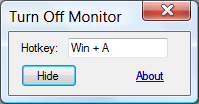
- Customizable hotkey (click to capture hotkey, escape to stop)
- Tooltip on tray icon now shows what the hotkey is
- Custom hotkey is saved in a per-user config file (%appdata%\turnoffmonitor\turnoffmonitor\1.0.0.0\config.txt)
- Clicking the tray icon no longer turns off the monitor, it just brings up the window
- Interface changes- more compact, less distracting. Clicking the link takes you to the latest post for this program.
- Fixed a really annoying bug where the system would immediately turn the monitor back on
Like before, hit a key or jiggle the mouse to turn the monitor back on (you can adjust that in the system power settings), and requires .Net 2.0.

3Feb/08Off
Turn Off Monitor v1
A little utility for when you want to turn off your monitor. Sits in the system tray doing nothing until you click the button or hit win+z. Hit any key to turn it back on.
Future todo list:
- Customizable hotkey
- Probably some other stuff
